FlowField 流场寻路算法实现
实验室(Flow Field Lab)
- 拖动 蓝点(起点/刷怪点)和红点(目标)。
- 左键拖拽 在网格上涂抹障碍;按住 Shift 拖拽擦除。
- 开始后,绿色小圆点会沿着流场向量移动(叠加可选的分离力、墙修正)。
- 看不见蓝点可能是因为被绿点挡住了,直接拖动即可
- 注意:墙权重会导致在狭窄复杂道路无法正常通过,该模拟是我拿ai跑的,有一些bug比如流场指向错误靠墙流场错误导致单位卡寻路,所以仅供方便大家理解流场原理
说明:实验室是一个“可玩”的简化版:
- 拖动起点/终点
- 实时涂抹障碍
- 显示每个格子的成本值(权重)与向量方向
- 运行/暂停单位移动(可选分离力 / 靠墙加权 / 墙碰撞修正)
真实项目里我是用 Godot C# 写的(下面会贴核心代码)。
前言
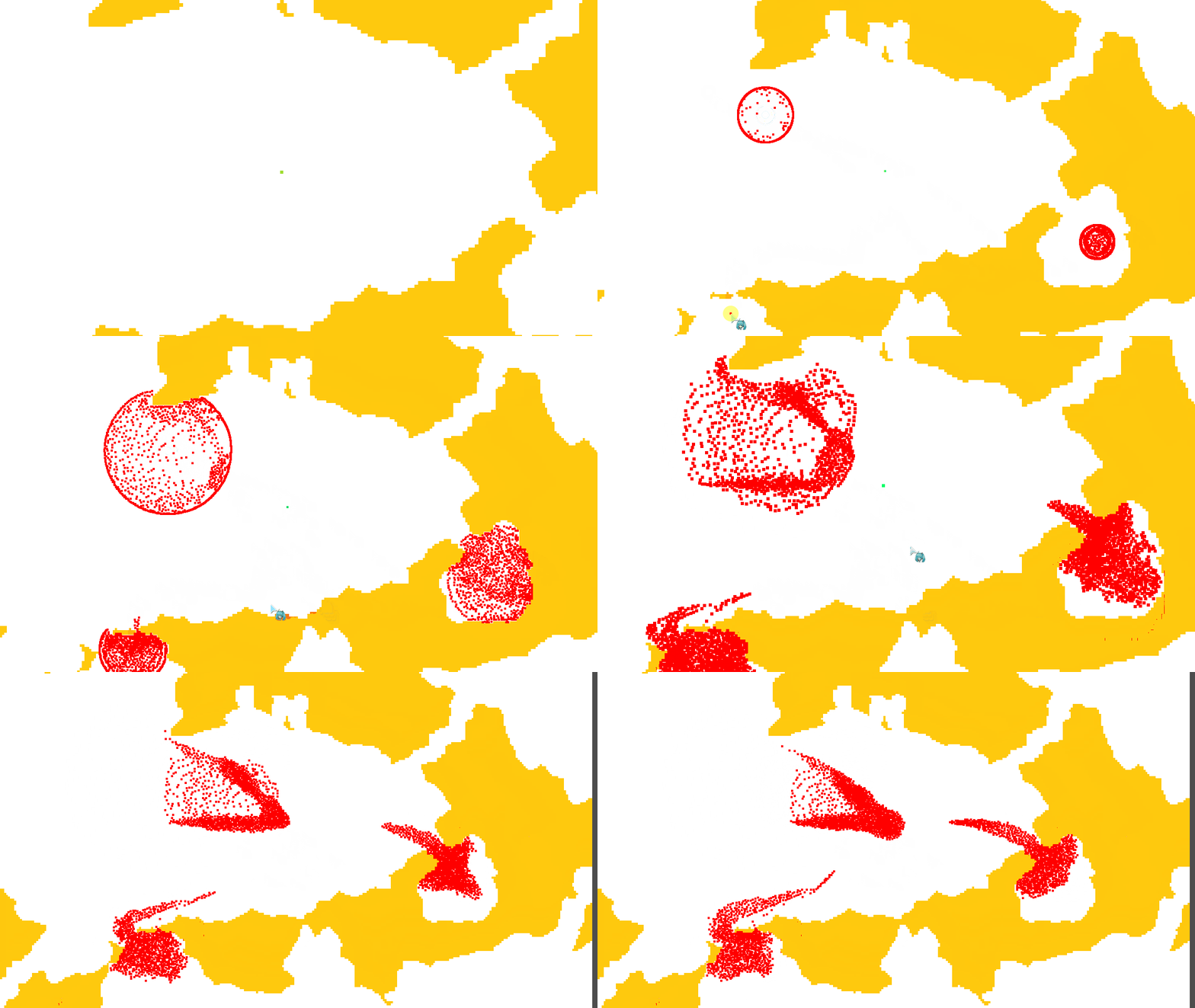
最近做游戏有了这种使用场景,于是就研究了一下寻路算法,简单的说,流场寻路(FlowField)就是在开局直接算出成本场然后生成流场,也就是地图所有位置到目标点的权重,然后让大量单位即敌人,使用这个流场直接寻路,为了优化性能,我还做了多线程和数据分离,下面我给大家分享一下我的实现逻辑
效果展示
代码实现
流场脚本主要维护三块数据:
- 成本场
CostFiled:每个格子到目标的累计代价(float[,])。 - 向量场
FlowFiled:每个格子一个单位向量,指向“更低成本”的方向(Vector2[,])。 - 实体分桶
FlowEntities:按格子 ID 把单位分桶(Dictionary<int, List<long>>),用于快速找邻居(分离力)和附近墙体(墙修正)。
单位移动相关的逻辑我写在了敌人管理脚本上了,可以用状态机分成流场寻路状态和其他状态:
- 每 Tick 更新单位所属格子(flowID)
- 并行计算移动(
Parallel.For) - 叠加:流场速度 + 单位分离力 + 墙碰撞修正
ps:还可以给单位之间加orca避障,让性能更好,注意不要给单位之间添加硬碰撞修正
1)成本场:洪水填充(队列扩散)+ 靠墙加权
1.1 初始化:墙 = -1,其它 = Max
在 CalculateCostFiled(计算成本场) 里先把网格初始化:
- 墙(不可走)记为
-1 - 可走格子先记为
float.MaxValue
同时预处理一个 CostWall:
- 如果这个格子的 8 邻域贴着墙(任意相邻格是障碍),就标记为
true - 后续扩散时给它额外加一笔“靠墙惩罚”(让路径更愿意走通道中间,不添加可能会卡墙)
// FlowFieldManager.cs
private void CalculateCostFiled(bool[,] tileOccupy, Vector2 tager)      //注意,需要地块占用表,以及地块大小和地图大小
{
    //初始化数组,预处理靠墙地块膨胀
    CostFiled = new float[GridWidth, GridHeight];
    var CostWall = new bool[GridWidth, GridHeight];
    var allDirs = new (int x, int y)[]
    {
        (0, 1), (0, -1), (1, 0), (-1, 0),
        (1, 1), (1, -1), (-1, 1), (-1, -1)
    };

    for (int x = 0; x < GridWidth; x++)
    {
        for (int y = 0; y < GridHeight; y++)
        {
            if (tileOccupy[x, y])
                CostFiled[x, y] = -1;
            else
                CostFiled[x, y] = float.MaxValue;

            foreach (var dir in allDirs)
            {
                int dx = x + dir.x;
                int dy = y + dir.y;
                if (dx < 0 || dy < 0 || dx >= GridWidth || dy >= GridHeight)
                    continue;

                if (tileOccupy[dx, dy])
                {
                    CostWall[x, y] = true;
                    break;
                }
            }
        }
    }

    // ... 后面继续做队列扩散(1.2)
}
1.2 扩散:8方向 + 斜向 1.414 + 靠墙惩罚
扩散部分我用的是“队列 + 松弛更新”:
- 目标格子成本 = 0,入队
- 出队一个格子,遍历 8 邻域
- 直走成本 +1,斜走成本 +1.414
- 如果邻居贴墙,额外 +20(根据实际需求修改)
- 若计算出的新成本更低,则更新并把邻居入队
代码:
// FlowFieldManager.cs
// 计算目标点所在网格
int tagerX = (int)Math.Floor(tager.X / GridSize);
int tagerY = (int)Math.Floor(tager.Y / GridSize);

CostFiled[tagerX, tagerY] = 0;
var q = new Queue<Vector2I>();
q.Enqueue(new Vector2I(tagerX, tagerY));

//洪水填充
while (q.Count > 0)
{
    var vec = q.Dequeue();
    float cost = CostFiled[vec.X, vec.Y];

    for (int x = -1; x <= 1; x++)
    {
        for (int y = -1; y <= 1; y++)
        {
            //跳过本身
            if (x == 0 && y == 0)
                continue;

            int vx = vec.X + x;
            int vy = vec.Y + y;

            //跳过边界
            if (vx < 0 || vy < 0 || vx >= GridWidth || vy >= GridHeight)
                continue;
            //跳过墙
            if (CostFiled[vx, vy] == -1)
                continue;

            float nextCost = (x != 0 && y != 0) ? 1.414f : 1;

            float newCost = cost + nextCost + (CostWall[vx, vy] ? 20 : 0);
            if (CostFiled[vx, vy] > newCost)
            {
                CostFiled[vx, vy] = newCost;
                q.Enqueue(new Vector2I(vx, vy));
            }
        }
    }
}

GenerateFlowField();
ps:如果你引入了更多“非均匀代价”(比如地形成本、不同单位通行权重),可以把队列换成优先队列(Dijkstra)。
2)向量场:负梯度(差分)直接出方向
成本场出来以后,“每个格子往哪走”就很好算了。
我这里用的是“负梯度法”(用差分近似梯度):
costX = cost(x-1) - cost(x+1)costY = cost(y-1) - cost(y+1)(costX, costY)归一化,就是这个格子的流场向量
核心代码:
// FlowFieldManager.cs
private void GenerateFlowField()        //生成向量场
{
    FlowFiled = new Vector2[GridWidth, GridHeight];
    for (int x = 0; x < GridWidth; x++)
    {
        for (int y = 0; y < GridHeight; y++)
        {
            //负梯度法
            float costX1 = SafeGetCost(x + 1, y);
            float costX2 = SafeGetCost(x - 1, y);
            float costX = costX2 - costX1;

            float costY1 = SafeGetCost(x, y + 1);
            float costY2 = SafeGetCost(x, y - 1);
            float costY = costY2 - costY1;

            Vector2 vec = new Vector2(costX, costY);

            FlowFiled[x, y] = vec.Normalized();
        }
    }
}

private float SafeGetCost(int x, int y)     //安全获取成本
{
    if (x < 0 || y < 0 || x >= GridWidth || y >= GridHeight)
        return 1e4f;

    float cost = CostFiled[x, y];

    if (cost == -1)
        return 1e4f;

    return cost;
}
这里 SafeGetCost 我把越界和墙都当成一个很大的成本(1e4),这样差分出来的梯度会自然“推开墙”。
3)取向量:双线性插值,让移动不抖
如果单位每帧直接取“所在格子中心”的向量,容易出现两个问题:
- 单位跨格子时方向跳变,轨迹会抖
- 多个单位叠在同一格时表现比较“死板”
所以我这里在 GetFlowVector 里做了一个双线性插值:
- 取当前格子 + 右 + 下 + 右下 四个向量
- 按单位在格子内的相对位置做权重混合
核心代码:
// FlowFieldManager.cs
public Vector2 GetFlowVector(Vector2 vector)        //获取流场向量
{
    //计算网格
    int vecX = (int)Math.Floor(vector.X / GridSize);
    int vecY = (int)Math.Floor(vector.Y / GridSize);

    if (vecX < 0 || vecY < 0 || vecX >= GridWidth - 1 || vecY >= GridHeight - 1)
    {
        int safeX = Math.Clamp(vecX, 0, GridWidth - 1);
        int safeY = Math.Clamp(vecY, 0, GridHeight - 1);
        return FlowFiled[safeX, safeY];
    }

    //计算权重
    float wx = vector.X % GridSize / GridSize;
    float wy = vector.Y % GridSize / GridSize;

    //水平混合
    var vTop = FlowFiled[vecX, vecY] * (1 - wx) + FlowFiled[vecX + 1, vecY] * wx;
    var vBottom = FlowFiled[vecX, vecY + 1] * (1 - wx) + FlowFiled[vecX + 1, vecY + 1] * wx;
    //垂直混合
    var v = vTop * (1 - wy) + vBottom * wy;

    return v.Normalized();
}
这个小改动对观感提升很明显:单位转向更平滑,整体群体移动也更自然。
4)单位移动:流场速度 + 分离力 + 墙修正(并行)
4.1 先把单位按格子分桶(FlowEntities)
为了让“找附近单位”和“找附近墙”不至于每帧 O(N²),我在 FlowFieldManager 里维护了一个字典:
- Key:格子 ID(flowID)
- Value:这个格子里有哪些单位 ID(onlyID)
单位移动时,我会先更新它的 flowID(跨格子就从旧桶移除、加到新桶):
// EnemyManager.cs
private void UpdataUnitFlowID()        //实时更新流场ID
{
    for (int i = 0; i < enemyDatas.Count; i++)
    {
        var unitData = enemyDatas[i];

        int oldFlowID = unitData.flowID;
        int newFlowID = flowFieldManager.CalculateFlowID(unitData.position);

        if (newFlowID != oldFlowID)
        {
            unitData.flowID = newFlowID;

            flowFieldManager.EntityDel(unitData.onlyID, oldFlowID);
            flowFieldManager.EntityAdd(unitData.onlyID, newFlowID);
        }

        enemyDatas[i] = unitData;
    }
}
ps:这里的“格子 ID 展平公式”一定要和你的二维数组维度对应上。 我项目里用了
gridID = x * GridWidth + y,如果你地图不是正方形,建议你确认一下是否该用x * GridHeight + y或y * GridWidth + x。
4.2 GetIDSandCloseWall:一次拿到“邻居单位 + 附近墙最近点”
移动时我会用 GetIDSandCloseWall 做两件事:
- 找半径范围内有哪些单位(用于分离力)
- 找半径范围内有哪些墙,并计算“单位位置到墙格子的最近点”(用于墙修正)
它的思路很简单:
- 以单位所在格为中心,扫一个小方块范围(
-unitSize..unitSize) - 如果扫到的格子有单位分桶,就把 ID 收集起来
- 如果扫到的是墙,就算最近点
// FlowFieldManager.cs
public void GetIDSandCloseWall(Vector2 vector,int unitSize,List<long> ids,List<Vector2> points)     //获取半径内实体和墙的最近点
{
    ids.Clear();
    points.Clear();

    int vecX = (int)Math.Floor(vector.X / GridSize);
    int vecY = (int)Math.Floor(vector.Y / GridSize);

    for (int x = -unitSize; x <= unitSize; x++)
    {
        for (int y = -unitSize; y <= unitSize; y++)
        {
            int dx = vecX + x;
            int dy = vecY + y;

            if (dx < 0 || dy < 0 || dx >= GridWidth || dy >= GridHeight)
                continue;

            //单位
            int gridID = dx * GridWidth + dy;
            if (FlowEntities.TryGetValue(gridID, out var longs))
                ids.AddRange(longs);

            //墙
            if (CostFiled[dx, dy] != -1)
                continue;

            float wallLeftX = dx * GridSize;
            float wallLeftY = dy * GridSize;
            float wallRightX = (dx + 1) * GridSize;
            float wallRightY = (dy + 1) * GridSize;

            float closeX = Math.Clamp(vector.X, wallLeftX, wallRightX);
            float closeY = Math.Clamp(vector.Y, wallLeftY, wallRightY);

            points.Add(new Vector2(closeX, closeY));
            }
        }
}
4.3 分离力:让队伍散开,不要叠成一坨
我的分离力是典型的“重叠越深推得越狠”:
- 两个单位距离 < (半径A + 半径B) 认为重叠
- 推力 = 重叠深度 * 最大速度 * 系数
- 如果两个单位几乎完全重合(距离很小),用一个固定随机方向把它“抖开”
- 大家可以扩展成orca避障来优化单位重合,切记不要用单位之间硬碰撞,会抽搐
// EnemyManager.cs
private Vector2 CalculateSeparation(EnemyData pA, EnemyData pB)       //计算单位排斥力
{
    Vector2 vec = pB.position - pA.position;      // A -> B
    var dis = vec.Length();
    var sep = pA.unitRadius + pB.unitRadius;

    if (dis > sep)
        return Vector2.Zero;

    var deep = sep - dis;
    var force = deep * Math.Max(pA.moveSpeed, pB.moveSpeed) * 2;

    //固定随机生成推力方向可预测
    // ScriptHelper.Randf(...):项目里的随机辅助方法,我自己实现是因为需要随机在同一种子下固定,这样如果之后要做联机也可以简单同步了
    float rX = ScriptHelper.Randf(pA.random) * 2 - 1;
    float rY = ScriptHelper.Randf(pA.random) * 2 - 1;

    Vector2 vel;
    if (dis < 0.1f)
        vel = new Vector2(rX, rY).Normalized();
    else
        vel = -vec.Normalized();

    return vel * force;
}
4.4 墙修正:硬把单位从墙里推出来
我这里做的是“硬修正”(不是物理引擎那种连续碰撞):
- 先算出单位新位置
- 用之前收集的墙最近点列表,逐个做“圆 vs 点”的推开
// EnemyManager.cs
private Vector2 ApplyWallCorrect(EnemyData unitData, Vector2 newPosition, List<Vector2> _tmpWallPoints)       //硬靠墙修正,方法使用大家看下面即可明白
{
    Vector2 correctVec = newPosition;
    var points = _tmpWallPoints;
    float correctRange = unitData.unitRadius;

    foreach (var point in points)
    {
        Vector2 toPoint = point - correctVec;
        float dis = toPoint.LengthSquared();

        if (dis > correctRange * correctRange)
            continue;

        float dist = Mathf.Sqrt(dis);
        float deep = correctRange - dist;
        correctVec += -toPoint / dist * deep;
    }

    return correctVec;
}
4.5 最终移动:Parallel.For 并行 + MoveToward 平滑
最后把它们合起来,就是单位移动的主体:
- 多线程:
Parallel.For(0, enemyDatas.Count, ...) - 每个单位:
- 取流场速度
flow = GetFlowVector(pos) * moveSpeed - 取分离力
separation - 合成
total = flow + separation - 用
MoveToward限制加速度(会更像“有惯性”) - 算出新位置 + 墙修正 :
- 取流场速度
// EnemyManager.cs
[ThreadStatic] private static List<long> _tmpIds;
[ThreadStatic] private static List<Vector2> _tmpWallPoints;

private void UnitFlowMove(float delta)     //单位流场移动计算
{
    if (enemyDatas.Count == 0) return;

    var velcitys = new Vector2[enemyDatas.Count];
    var positions = new Vector2[enemyDatas.Count];

    //多线程计算移动
    Parallel.For(0, enemyDatas.Count, i =>
    {
        EnemyData enemy = enemyDatas[i];

        if (_tmpWallPoints == null) _tmpWallPoints = new();
        if (_tmpIds == null) _tmpIds = new();

        // unitRadius / 16:这里 16 对应我项目里格子大小,大家按自己项目调整
        flowFieldManager.GetIDSandCloseWall(enemy.position, (int)enemy.unitRadius / 16, _tmpIds, _tmpWallPoints);

        //目标流场速度和排斥力
        Vector2 flow = flowFieldManager.GetFlowVector(enemy.position) * enemy.moveSpeed;
        Vector2 separation = GenerateSeparation(enemy, _tmpIds);
        Vector2 total = flow + separation;

        //平滑 + 限速
        Vector2 limit = enemy.velcity.MoveToward(total, enemy.moveSpeed * delta);
        limit = limit.LimitLength(enemy.moveSpeed);
        Vector2 newPosition = enemy.position + limit * delta;
        newPosition = ApplyWallCorrect(enemy, newPosition, _tmpWallPoints);

        velcitys[i] = (newPosition - enemy.position) / delta;
        positions[i] = newPosition;
    });

    //更新位置(主线程)
    for (int i = 0; i < enemyDatas.Count; i++)
    {
        var unitData = enemyDatas[i];
        unitData.velcity = velcitys[i];
        unitData.position = unitData.position.Lerp(positions[i], 0.8f);

        enemyDatas[i] = unitData;
        enemyNodes[unitData.onlyID].unitNode.Position = unitData.position;
    }
}
开发步骤
如果你也想在项目里落一套,按这个顺序基本不会乱:
- 把地图网格化(明确
GridWidth/GridHeight/GridSize,准备一个tileOccupy[x,y]障碍数组)。 - 写成本场:从目标开始扩散,得到每个格子的 cost。
- 写向量场:用负梯度/最小邻居法,把 cost 变成方向。
- 写取向量:建议加双线性插值,手感/观感都提升。
- 接入单位移动:流场给方向,移动用
MoveToward + LimitLength做“有惯性”的转向。 - 加分离力:大群体必做,不然叠一坨。
- 加墙修正/靠墙加权:防止擦墙/卡墙。
- 再做性能:分桶、并行、临时对象复用(我这里就是
FlowEntities + Parallel.For + ThreadStatic)。
结尾
流场寻路对“同目标的大群体移动”的场景非常适配:
- 算一次,全员共享
- 单位越多越赚
如果你后面还想继续进阶让观感更好,可以考虑给单位加领队(Cohesion),让大部队往领队靠拢来保持队形,我暂时没有时间去实现,以后有时间再研究吧